Signal Flow
This page shows how sound and video travel through the system, from microphones and cameras all the way to the speakers, screens and YouTube. It is mainly for maintainers and for AI assistants answering "what connects to what" questions, but the diagrams are simple enough for anyone.
Physical wiring diagram
The diagram below shows the actual physical connections (cabling) between the equipment.
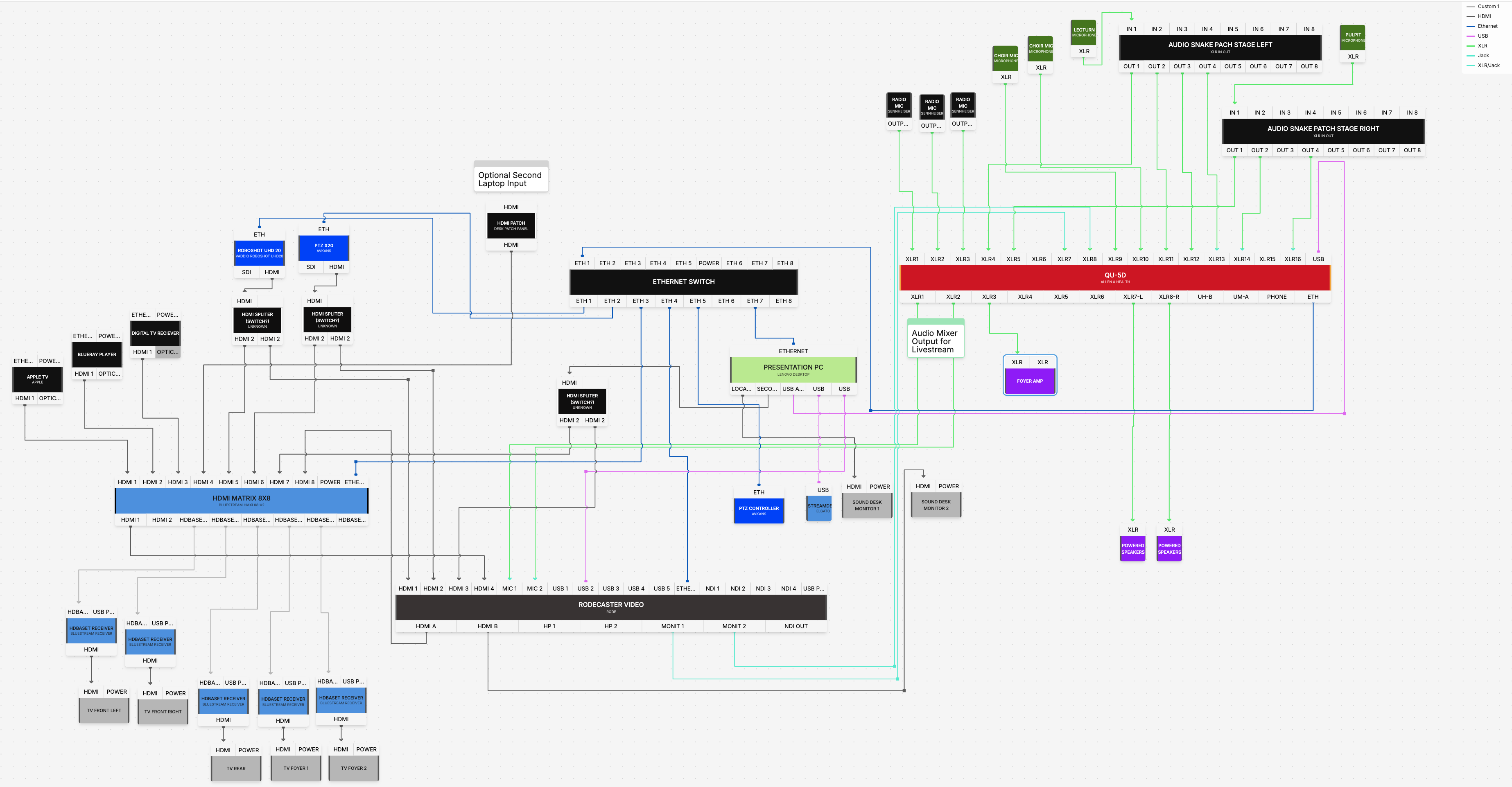
Draft diagram — work in progress
This is an early rough draft (v3). It will be replaced once Mills IT has confirmed every connection and channel on site. Treat the logical diagrams below and the Equipment List as the more reliable reference until this wiring diagram is finalised.
The whole system
flowchart TD
    subgraph Inputs
        MICS[Microphones Ch1-5 + Rode M5 pair]
        CAM1[Camera 1 - RoboShot HDMI 12]
        CAM2[Camera 2 - AVKANS 20X PTZ]
        PC[PowerPoint PC - NUC]
    end

    MICS --> QU[Allen & Heath QU-5D Mixer]

    QU -->|Main LR| JBL[JBL SRX812P - Auditorium]
    QU -->|Foyer Matrix| FAMP[Foyer Amplifier] --> FSPK[Foyer Speakers]
    QU -->|Livestream Matrix| RCV[RodeCaster Video]

    CAM1 --> RCV
    CAM2 --> RCV
    RCV --> YT[YouTube Livestream]

    PC --> MX[Bluestream HDMI Matrix]
    MX --> TVL[Front TV Left]
    MX --> TVR[Front TV Right]
    MX --> CONF[Rear Confidence Monitor]
    MX --> FIRE[Fireplace TV]
    MX --> MEET[Meeting Room TV]

    subgraph Control
        JOY[AVKANS Joy Pro Controller]
        SD[StreamDeck XL + Companion on NUC]
    end
    JOY -. moves .-> CAM1
    JOY -. moves .-> CAM2
    SD -. switch/preset/stream .-> RCV
    SD -. recall presets .-> CAM1
    SD -. recall presets .-> CAM2
    SD -. next/prev slide .-> PC
Audio signal flow
flowchart LR
    M[Microphones] --> QU[QU-5D]
    QU -->|Main mix| SPK[Church Speakers - JBL SRX812P]
    QU -->|Foyer matrix mix| AMP[Foyer Amp] --> FS[Foyer Speakers]
    QU -->|Livestream matrix mix| RCV[RodeCaster Video] --> YT[YouTube]
Key points:
- One mixer, three outputs. The QU-5D builds the main, foyer and livestream mixes independently.
- The livestream and foyer are matrix mixes — separate balances, not just copies of the room sound. This is why a microphone can be present in one mix but not another.
➡️ Audio Overview · Livestream Mix · Foyer Mix
Video signal flow
flowchart LR
    C1[Camera 1 - RoboShot] --> RCV[RodeCaster Video]
    C2[Camera 2 - AVKANS] --> RCV
    AUD[Livestream audio from QU-5D] --> RCV
    RCV --> YT[YouTube]
Key points:
- Both cameras feed the RodeCaster Video.
- The RodeCaster combines the chosen camera with the livestream audio mix and streams to YouTube.
➡️ Video Overview · RodeCaster Video
Presentation / display signal flow
flowchart LR
    PC[PowerPoint PC - NUC] --> MX[Bluestream HDMI Matrix]
    MX --> TVL[Front TV Left]
    MX --> TVR[Front TV Right]
    MX --> CONF[Confidence Monitor]
    MX --> FIRE[Fireplace TV]
    MX --> MEET[Meeting Room TV]
Key points:
- The PowerPoint PC is the source.
- The Bluestream matrix routes that picture to any of the screens.
➡️ TV Distribution · Bluestream Matrix
How control flows (who tells what to do)
| Control | Talks to | To do what |
|---|---|---|
| StreamDeck XL (via Companion on the NUC) | RodeCaster, cameras, PowerPoint | Switch cameras, recall presets, start/stop stream, change slides |
| AVKANS Joy Pro Controller | Camera 1 and Camera 2 | Pan, tilt, zoom by hand |
| QU-5D faders/mutes | The three audio mixes | Balance sound for room, foyer, livestream |
Where signals are most likely to break (for troubleshooting)
| Link | If it fails | Page |
|---|---|---|
| Mic → QU-5D | No / one mic missing | No Sound |
| QU-5D livestream matrix → RodeCaster | No audio online | No Livestream Audio |
| Camera → RodeCaster | Black/frozen camera | No Camera Video |
| Controller → Camera | Camera won't move | Camera Not Moving |
| PC → Matrix → TV | Blank / wrong screen | TV Not Working |
| RodeCaster → YouTube | Stream drops | Network Overview |